Spec Reviewer now embeds requirements directly into code review
Today we’re extending the same model to Spec Reviewer. Unmet requirements now appear inline, pinned to the exact code paths that cause them, and reviews include screenshots from the agent’s sandbox session showing the evaluated behavior.
Unmet requirements appear inline as embedded review suggestions, with sandbox screenshots showing exactly how behavior was evaluated.
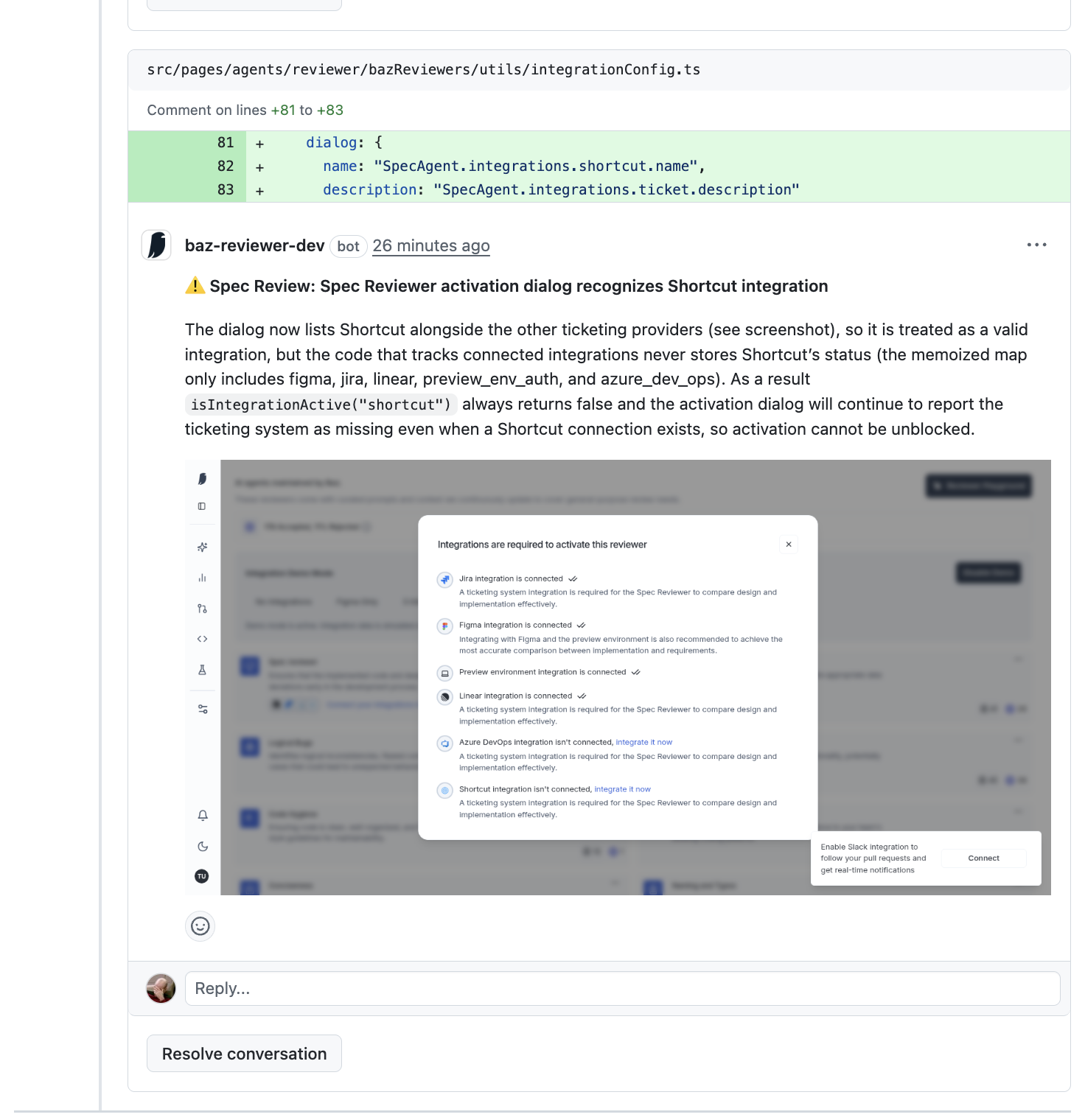
Spec Reviewer explains inline why the activation dialog remains blocked and why the reviewer cannot proceed, tying the unmet requirement directly to the code responsible for tracking integration state.
How it works
When Spec Reviewer evaluates a change, it no longer reports unmet requirements as detached feedback. Each unmet recommendation is now embedded inline, pinned to the exact lines of code responsible for the issue.
The reviewer explains why the requirement is unmet, how it affects behavior, and what prevents the system from recognizing the integration or flow as valid. This removes the need for reviewers or authors to infer where a requirement applies.
For behavior-dependent checks, Spec Reviewer also captures screenshots from the agent’s sandbox session and attaches them directly to the review comment. Reviewers can see the activation dialog, integration state, or UI flow exactly as the agent observed it during evaluation.
The result is a review comment that contains the requirement, the precise code location, and visual evidence of the evaluated behavior in one place.
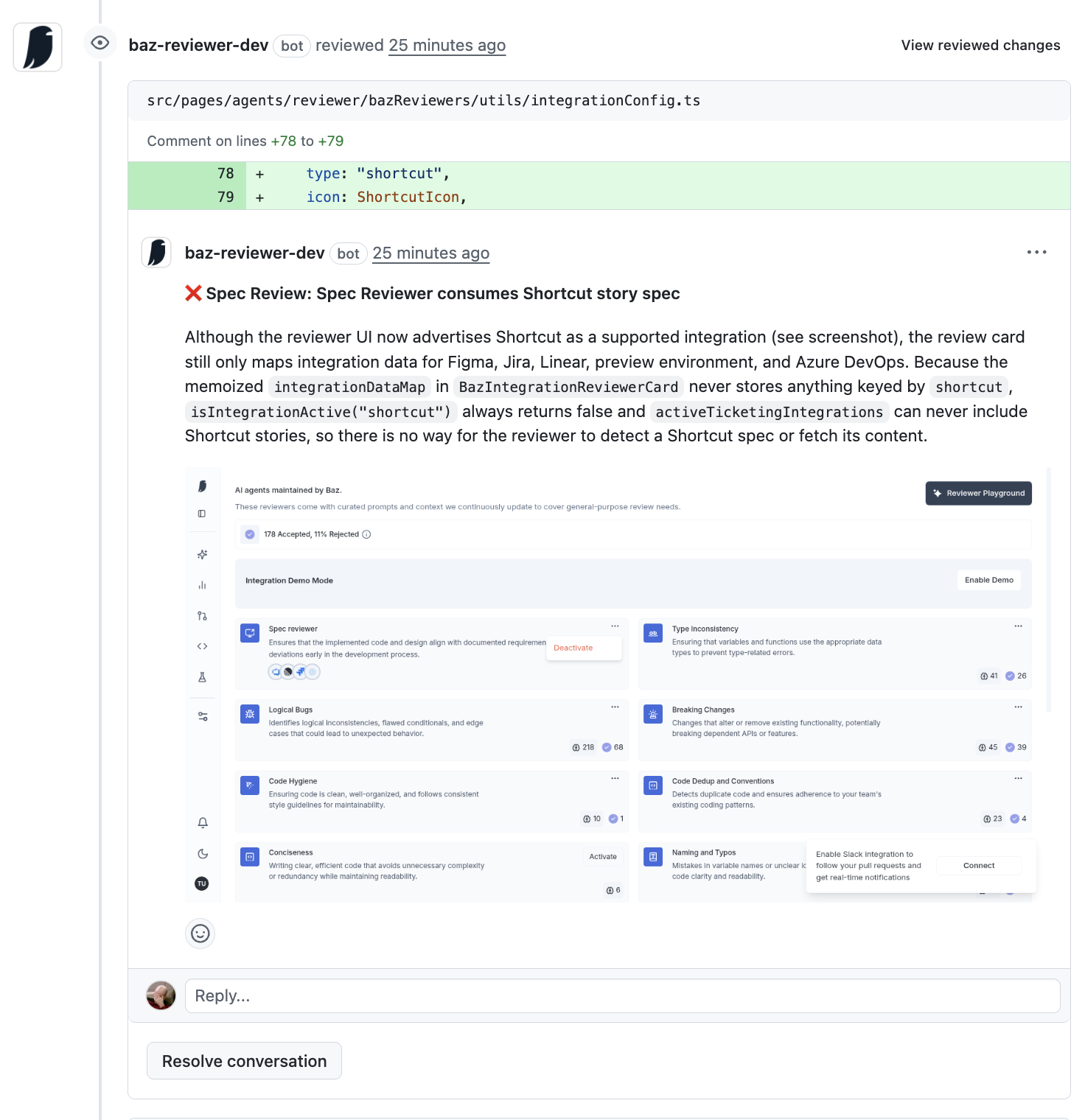
Spec Reviewer flags a different unmet requirement on the code path that declares the Shortcut integration type. While the UI advertises Shortcut as supported, the reviewer detects that the integration data map never stores any entries keyed by shortcut.Because of this, the reviewer cannot detect Shortcut stories or fetch their content, making it impossible to consume Shortcut-based specifications during review. The inline comment explains exactly which data structure is missing the mapping and how that prevents requirement ingestion.
Screenshot captions
Inline requirement violation, pinned to code Spec Reviewer flags the unmet Shortcut integration requirement directly on the code path responsible for activation state tracking, explaining why the integration can never be marked active.
Behavior evidence from sandbox session The review includes screenshots from the agent’s sandbox session, showing the activation dialog and integration state that caused the requirement to fail.
Configuration and metadata mismatch surfaced inline Spec Reviewer highlights where integration metadata is missing from the workspace payload, explaining why the UI cannot display status badges even when the integration is connected.
Spec Reviewer is flagging an unmet requirement related to integration metadata display. The Shortcut integration is accessible from settings and can be configured, but the reviewer detects that the integration status payload does not populate the metadata required by the workspace grid.As a result, even when Shortcut is connected, the UI cannot display workspace labels or status badges. The inline suggestion explains which fields are set and which are missing, and why the workspace view cannot reflect the true integration state.




.png)